
To-Dos + Campaign Statuses
Your campaigns, deadlines, and next steps are all in one place.
The To-Do Center brings everything you need into one organized, easy-to-navigate home on your My Campaigns page. It's designed to help you stay on track, never miss a deadline, and clearly understand the status of every campaign you’re involved in - and those you applied to!
The Campaign Dashboard:
Includes 3 parts - The To-Do List, Your Latest Collabs, & Recent Applications
Consolidates all your campaign tasks in one place
Sorts your tasks by urgency (late → due today → due tomorrow → etc.)
Shows you exactly what you need to take action on next - helps you confirm, upload, or complete actions faster
Gives clear, easy-to-understand campaign statuses - including when you'll know if you're selected, and if you've been selected or not
Adds new visual notifications (including a heartbeat pulse!) when something needs your attention
🔥 To-Dos
This is the top section of your My Campaigns page - your personalized, smart, priority-ranked task list. Your tasks are automatically ranked from most urgent to least urgent - starting with content that's past due.
What shows up here:
Confirm your spot (if you’ve been selected and haven’t confirmed yet)
Upload content (if you’ve been selected, posted on IG, and now need to upload to Hummingbirds)
Add missing content (if you’ve uploaded some but not all requirements)
To-Dos tell you exactly what needs attention.
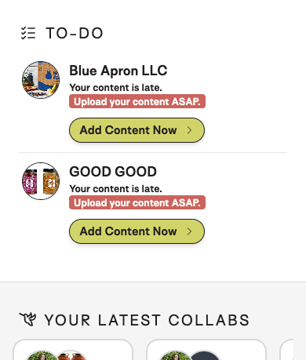
📸 Your Latest Collabs
After you’ve uploaded the required content for a campaign, it moves into Your Latest Collabs, right below the To-Do Center.
Here you can:
View campaigns you’re currently participating in & have already uploaded content for
Upload additional content if you’d like
Your campaigns stay here for 30 days after the campaign due date.

📝 Recent Applications
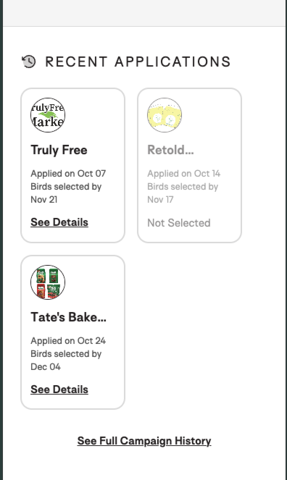
This is visibility into the campaigns you’ve applied for, transparency on when selections will be complete, & and if you've been selected or not!
The Recent Applications section shows:
Everything you’ve applied to in the last 30 days
When you applied
When creators are expected to be selected
Your application status - including if you were not selected
And right below this, you can still click to see your Full Campaign History!
❤️ Smart Notifications
Visual cues to help you stay on top of things:
Your menu is located at the bottom of the screen.
If you have new tasks, you’ll see a little heart icon on the My Campaigns tab.
If there’s something new you haven’t viewed yet, the heart will pulse to grab your attention.
We’ll continue refining this feature over time - your feedback guided this release, and it will guide the next versions too.