
How to Upload Your Campaign Content if We Can’t Retrieve It from Instagram: Get your file from Instagram
This option will export the posted media and deliver it to you via email. Note that once exported, you’ll have 4 days to download your export. It can take minutes up to 48 hours to receive this email with the export link.
⚠️ This will not work if you made your content inside Instagram and added music from Instagram. Instagram merges that music into the file permanently, so only one version exists and it has the music in it. Go to Rebuild and repost instead.
Step 1. Ask Instagram for your Media
Go to your Instagram account Settings.
Choose Your information and permissions.
Choose Export your information.
Click Create export
If you have multiple Accounts select the profile associated with the content.
Choose Export to device.
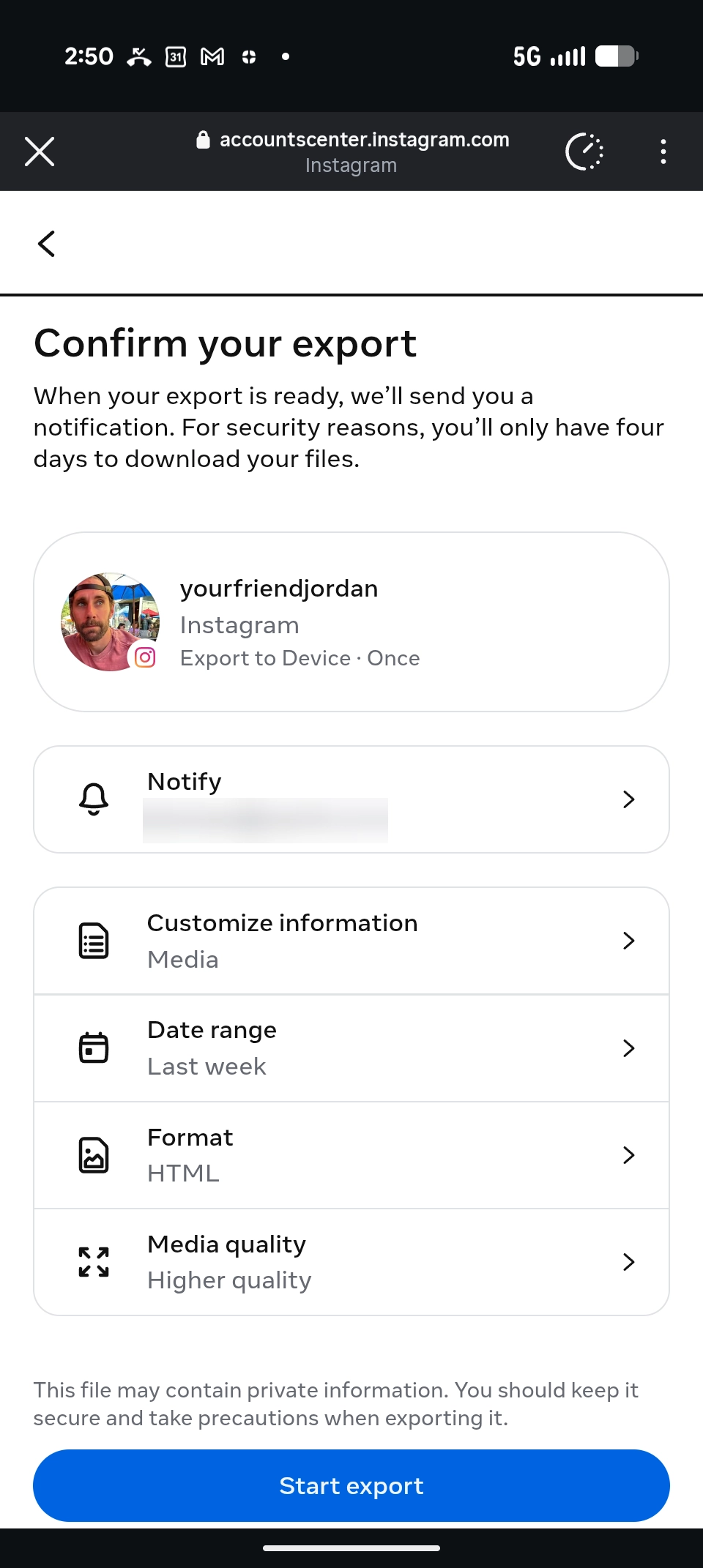
Configure your export
Select which email you Instagram to Notify when complete.
Customize information by deselecting everything BUT “Media”.
Change Date range to timeframe in which the content was posted.
Change Media Quality to High
Click Start Export.
Still stuck? Relevant Instagram help articles:
Step 2. Wait for Instagram to send it
Instagram will email you and send you a notification when your file is ready. How long it takes depends on how much content your account has.
⏰Your download link expires after four days. Save the file as soon as it arrives.
Step 3. Open your export and find your file
Your export arrives as a zip file, which is a folder that has been packed up. Unpack it first.
iPhone. Open the Files app, find the zip in Downloads, and tap it once. A folder appears with the same name.
Android. Open Files or My Files, find the zip in Downloads, tap it, then tap Extract or Unzip.
Computer. Double-click the zip in your Downloads folder.
Then open media, then the folder for what you posted (posts, reels or stories), then the month it was posted, shown as YYYYMM.
Look for two files that look the same. One has the music, one does not.
✓ Upload the one without the music.
Regardless of device, the file path will look something like this. Change path based on whether it’s a Reel, Story, or Post.

If there is only one file and it has the music, the music was merged in permanently. Go to Rebuild and repost.
Then upload it
Go back to your submission.
Tap Upload photo or video.
Choose your file.
Finish the rest of your submission as normal.
Your file then goes to review along with the rest of your submission.
👈 Not your situation? Go back to Why your video didn't upload.